
A Masked Aadhaar card is a privacy-enhanced version of the standard Aadhaar card. It replaces the first eight digits of the 12-digit Aadhaar number with placeholders like “XXXX-XXXX,” revealing only the last four digits (e.g., XXXX-XXXX-1234).
All other details, such as your name, date of birth, gender, address, photograph, and QR code, remain unchanged and visible.
Features of Masked Aadhaar Card
- Masked Number Format: First 8 digits replaced with ‘XXXX-XXXX’; last 4 digits visible.
- Complete Demographic Information: Name, photo, DOB, gender, and full address are uncompromised.
- Encrypted QR Code: Secure digital packaging of full Aadhaar data for authorized scanning.
- Digitally Signed: Ensures document validity and protects against tampering.
- Password Protection: The downloaded PDF e-Aadhaar is password-protected.
- Multi-Platform Access: Available via UIDAI’s MyAadhaar portal, mAadhaar app, and DigiLocker.
- Legally Valid: Equal legal status as regular Aadhaar for identity verification.
- Suitable for KYC: Accepted by many private banks, telecom companies, and services needing Aadhaar verification.
Key Features and Differences from Regular Aadhaar
| Feature | Masked Aadhaar | Regular Aadhaar |
| Aadhaar Number Display | First 8 digits masked (e.g., XXXX-XXXX-1234) | Full 12 digits visible |
| Biometric Details | Excluded in downloadable version for privacy | Included (but not visible on card; stored in UIDAI database) |
| QR Code | Present, scannable for verification | Present |
| Other Details | Name, DOB, gender, address, photo unchanged | Same |
| Format | Digital PDF or PVC card option | Digital PDF, physical PVC, or paper card |
| Validity | Legally equivalent; valid as ID proof | Valid as ID proof |
| Download Cost | Free (PVC version: ₹50) | Free (PVC: ₹50) |
| Security | Enhanced privacy; reduces misuse risk | Standard; full number exposure possible |
Note: The main difference lies in privacy: Masked Aadhaar minimizes data exposure without compromising functionality
Download a Masked Aadhaar Card
You can download it for free via the UIDAI website or mAadhaar app. No visit to an Aadhaar center is required if your details are up-to-date.
Via UIDAI Website (myAadhaar Portal)
- Visit myaadhaar.uidai.gov.in.
- Click “Login” and enter your 12-digit Aadhaar number.
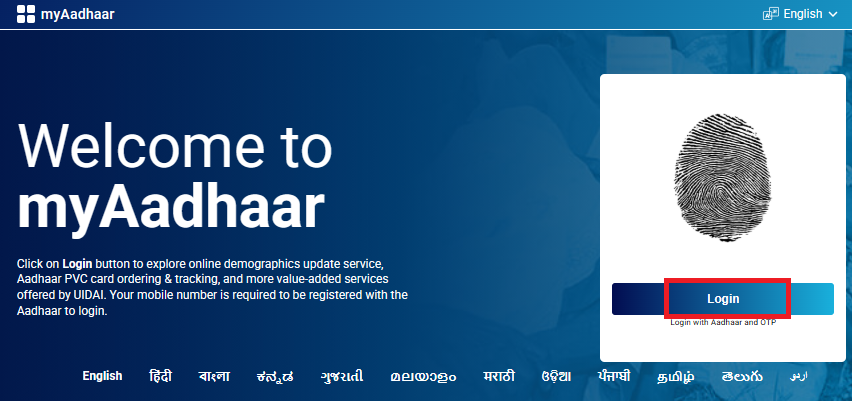
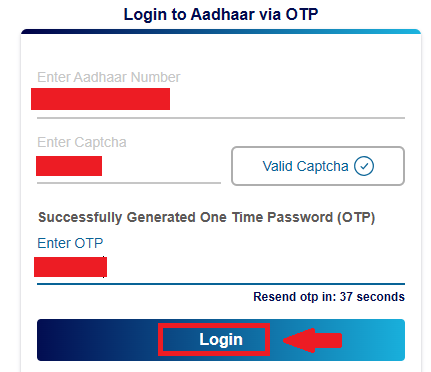
- Request an OTP, which will be sent to your registered mobile number.
- Enter the OTP and log in.
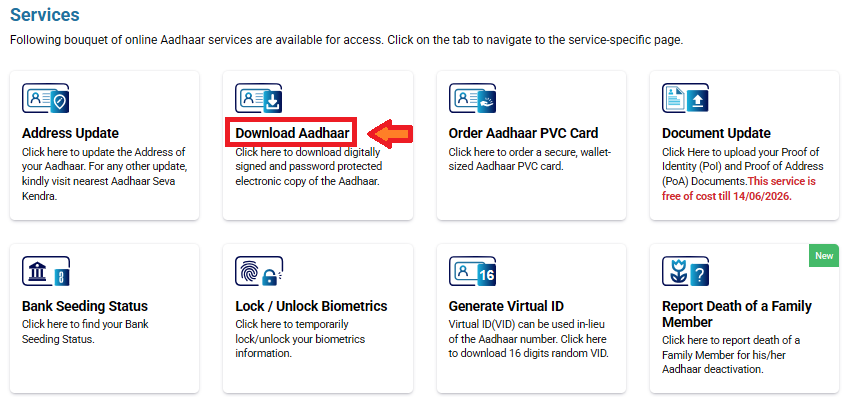
- Navigate to “Download Aadhaar” under the “Services” section.
- Select the “Masked Aadhaar” option.
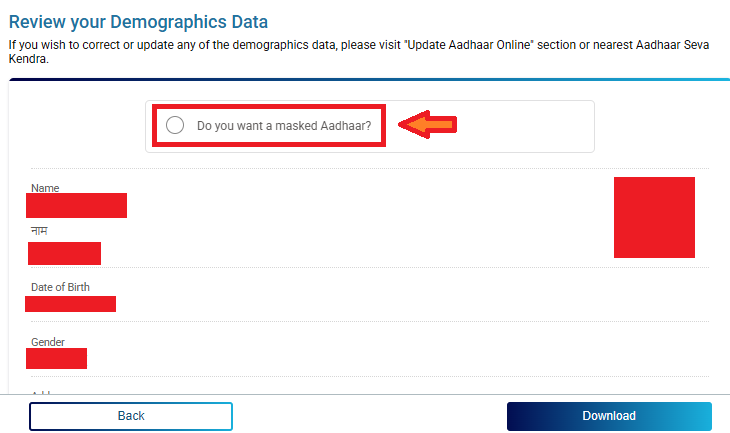
- Click “Download” to get the PDF.
- Open the file using the password: First four letters of your name in uppercase + birth year (e.g., AMIT1990 for Amit born in 1990).
Via mAadhaar App
mAadhaar is the official mobile application developed by UIDAI that allows residents to carry their Aadhaar digitally on their smartphone. Through this app, users can view Aadhaar details, download e-Aadhaar, generate Virtual ID, lock or unlock biometrics, and download a masked Aadhaar for safe sharing.
Follow these simple steps to get your masked Aadhaar on your phone:
- Download the mAadhaar app from Google Play Store or Apple App Store.
- Launch the app and create a profile using your Aadhaar number and OTP.
- Go to “Download Aadhaar” in the “Get Aadhaar” section.
- Choose “Masked Aadhaar.”
- Enter required details and download the PDF (same password as above).
For a physical PVC version, order it via the portal or app for ₹50; it will be delivered to your registered address within 5-10 days. If you’ve lost your Aadhaar number, retrieve it using your registered mobile or email via the portal.
DigiLocker
DigiLocker is an official digital document platform provided by the Government of India. It allows users to store, access, and share government-issued documents, including Aadhaar, in a secure digital format.
Follow these simple steps to get your masked Aadhaar using DigiLocker:
- Open the DigiLocker app or visit the DigiLocker website – https://www.digilocker.gov.in.
- Sign in using your mobile number or Aadhaar number.
- Complete the OTP verification.
- Go to the Issued Documents section.
- Select UIDAI as the document issuer.
- Choose Aadhaar Card from the list.
- Your masked Aadhaar will appear on the screen.
- Download or save the PDF to your device.
The Masked Aadhaar holds the same legal validity as the regular Aadhaar under the Aadhaar Act 2016. It is accepted for most identity and address proofs by banks, telecom providers, and government services where full number isn’t essential. UIDAI mandates that all forms of Aadhaar (physical, e-Aadhaar, masked, mAadhaar) are equally valid.
However, always check with the specific institution, as some may require the unmasked version for compliance.
When and Where to Use Masked Aadhaar
| Use Masked Aadhaar When… | Avoid Masked Aadhaar When… |
|---|---|
| Verifying identity on websites or apps that do not require the full Aadhaar number | Applying for government subsidies or welfare schemes that require full Aadhaar |
| Completing KYC for telecom services, existing bank accounts, insurance, and financial services | Opening a new bank account or doing high-value financial transactions |
| Using Aadhaar as identity proof in hotels, airports, online shopping, education, or hospitals | Filing Income Tax, PAN linking, or using Aadhaar-based government portals |
| Sharing Aadhaar with private or non-government organizations | Any service that requires full Aadhaar number for verification |
| Protecting your Aadhaar number from unnecessary exposure | When UIDAI specifically asks for a regular Aadhaar copy |
Limitations of Masked Aadhaar
| Limitation | Explanation |
|---|---|
| Not accepted everywhere | Some financial and government services require full Aadhaar details |
| Not valid for subsidies | Cannot be used for DBT, pensions, or welfare schemes |
| Separate verification needed | Biometric or OTP verification may still be required |
| System compatibility | Some organizations do not yet support masked Aadhaar |
Masked Aadhaar – FAQs
Masked Aadhaar is a secure version of your Aadhaar card in which the first eight digits of your Aadhaar number are hidden and only the last four digits are visible. It helps protect your identity from misuse.
Yes. Masked Aadhaar is issued by UIDAI and is legally valid for identity verification in most cases where full Aadhaar details are not required.
You can use masked Aadhaar for most everyday purposes such as KYC, hotel check-in, or online verification. However, some government services and financial institutions may require the full Aadhaar number.
You can download masked Aadhaar from official UIDAI platforms such as the UIDAI website, mAadhaar app, or DigiLocker by selecting the masked Aadhaar option.
Yes. Since most of the Aadhaar number is hidden, masked Aadhaar is safer to share than a regular Aadhaar copy, especially with private or non-government organizations.
Not everywhere. Some government portals, subsidy programs, and financial services require full Aadhaar details, where masked Aadhaar may not be accepted.