
The Aadhaar card, a 12-digit unique identification number issued by the Unique Identification Authority of India (UIDAI), serves as a foundational proof of identity and address for residents in India. Checking Aadhaar card status allows Indian residents to track the progress of their enrollment or updates.
Aadhaar Enrolment and Update Status
Before diving into the steps, gather these essentials to avoid frustration:
- Enrolment ID (EID): A 28-digit number (format: YYYY/XXXXX/XXXXXXXXX) from your acknowledgment slip for new enrolments.
- Service Request Number (SRN) or Update Request Number (URN): For update requests (14- or 28-digit).
- Date and Time of Enrollment/Update: Exact details from the slip (DD/MM/YYYY and HH:MM).
- Registered Mobile Number: Linked to your Aadhaar for OTP/SMS verification.
- Internet Access or SMS-Enabled Phone: For online/app methods; no data charges apply via UIDAI.
- Captcha Handling: Basic literacy; audio options available for accessibility.
Note: If you have lost your slip, retrieve EID via the “Forgot EID” option on the portal using biometrics at an Aadhaar Kendra.
- Access the Portal: Open a web browser and navigate to the official UIDAI resident portal at https://uidai.gov.in/. Select your preferred language from the dropdown if needed (e.g., English, Hindi).
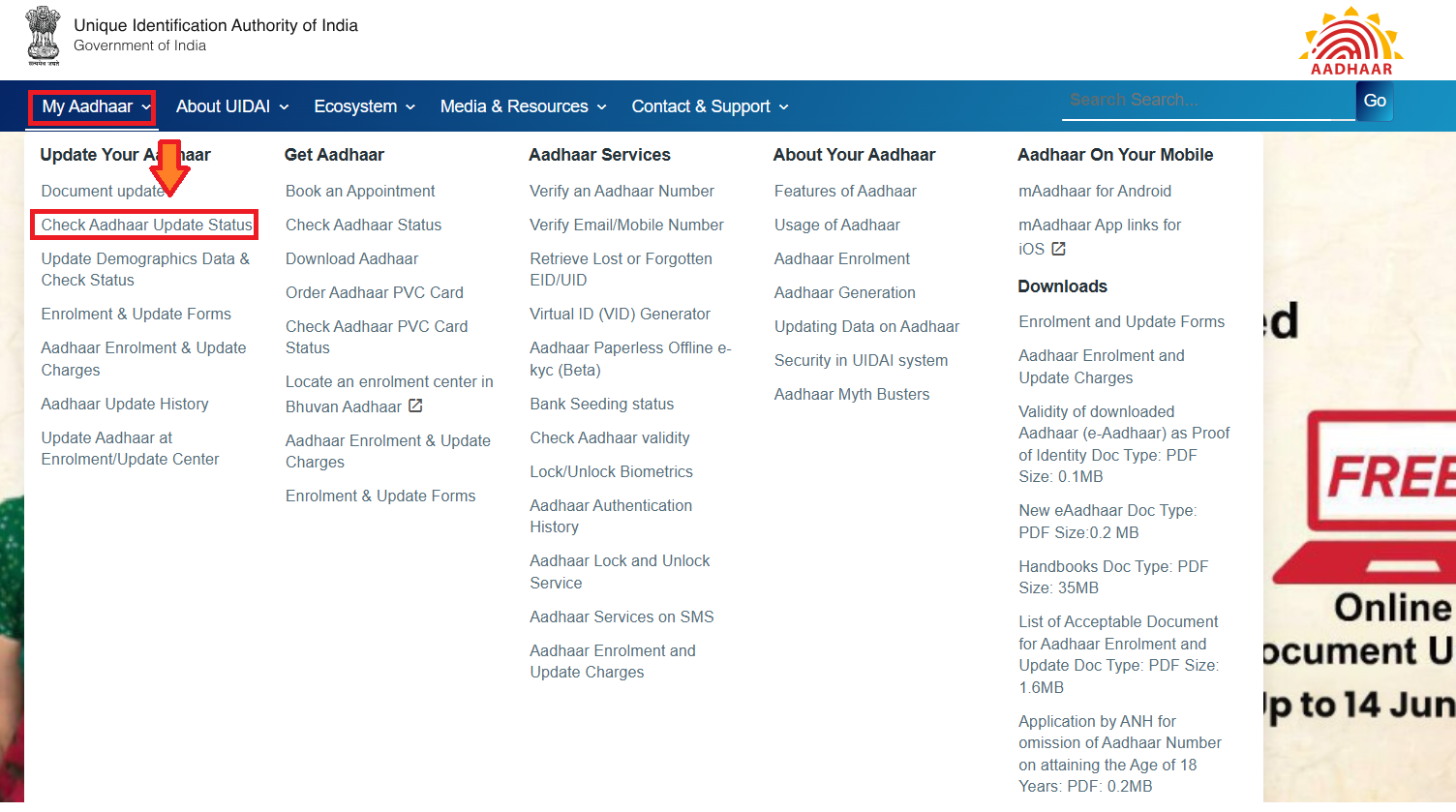
- Select Aaadhar Status Option: On the homepage, from the dropdown menu from “My Aadhaar” click on “Check Aadhaar Update Status”
You can also visit myaadhaar.uidai.gov.in and select the ‘Enrolment & Update Status’ option to check your Aadhaar status online.
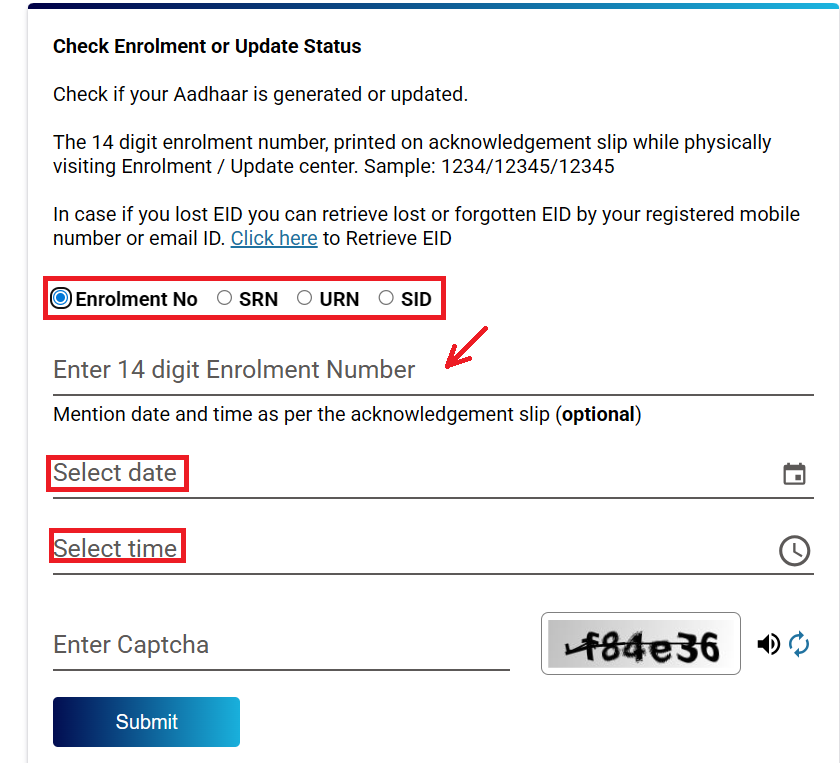
- Enter Enrolment Details: Input your 14-digit Enrollment Number (first part of the 28-digit EID) and the 14-digit Date/Time stamp (format: DD/MM/YYYY HH:MM:SS) exactly as on your acknowledgement slip.
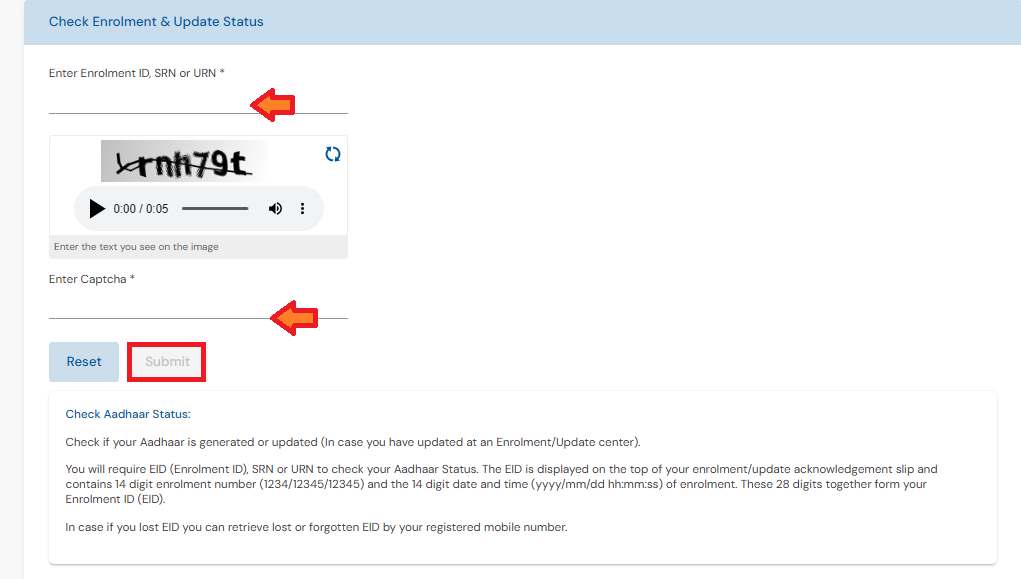
- Complete CAPTCHA Verification: Type the alphanumeric code shown in the image to confirm you’re not a robot; if unclear, refresh for a new one. Click the “Submit” button to process your request.
- View the Status: The screen will display the current status (e.g., “Your Aadhaar is under process,” “Aadhaar generated,” or “Rejected with reason“). If generated, a link to download e-Aadhaar will appear.
Note: Processing can take 30-90 days, for new enrolments. In case of updates the process is faster and it takes around 15-30 days.
Alternative Methods for Checking Aadhaar Status
Apart from checking Aadhaar status on the UIDAI website, residents can also track their Aadhaar enrolment and update requests through other official channels.
SMS Method
- Compose Message: For enrollment, type “UID STATUS <14-digit Enrollment Number>” (e.g., UID STATUS 12345678901234). For updates, use “UID STATUS <14-digit URN>”.
- Send to Shortcode: SMS to 51969; receive instant reply with status details (e.g., “Aadhaar generated” or “Under process”).
mAadhaar App Method
- Download and Install: Get the official mAadhaar app from Google Play Store or Apple App Store.
- Register/Login: Open the app, set a 4-digit PIN, and login using your Aadhaar-linked mobile for OTP verification.
- Navigate to Status: Tap “My Aadhaar” > “Check Enrollment/Update Status.”
- Enter Details: Input EID/URN/SRN and submit; view detailed status with notifications for changes.
UMANG App Method
- Install and Register: Download UMANG from app stores, register with mobile/email, verify OTP, set MPIN.
- Search for Service: Open app, go to services that appear on the left side and then click on all Services, next go to Aadhaar and then from the options you can choose “Check Enrolment & Update Status”.

- Input Reference: Enter EID/URN/SRN, solve any CAPTCHA if prompted.
- Submit and View: Click on Submit and you will get the status instantly.
Aadhaar Card Status – FAQs
You can check Aadhaar status online using your Enrolment ID (EID) or Update Request Number (URN) on the official UIDAI portal. It shows whether your Aadhaar enrolment or update is under process, approved, or completed.
To check Aadhaar status, you need either: 14-digit Enrolment ID (EID) for new Aadhaar, or Update Request Number (URN) for Aadhaar update requests, along with a registered mobile number to receive the OTP.
Aadhaar enrolment or update status usually remains “Under Process” for 7 to 30 days, depending on verification and data processing by UIDAI.
This means UIDAI has successfully processed your Aadhaar or update request. You can now download your e-Aadhaar from the official UIDAI website.
No. A registered mobile number is required because UIDAI sends an OTP for verification before showing the status.