
Losing your Aadhaar card or forgetting your Aadhaar number can be stressful, especially when you need it for banking, mobile verification, or government services. UIDAI provides an official recovery system that allows residents to retrieve their Aadhaar number or Enrolment ID online using basic details and a registered mobile number.
Documents Required
For most retrieval methods, no physical documents are mandatory, as verification relies on demographics and biometrics. However:
- Online Retrieval: No documents; just name, linked mobile/email, and CAPTCHA.
- Enrolment Center Visit: Provide verbal demographics (name, gender, PIN code). If multiple matches, additional details like year of birth or care-of address. Biometrics (fingerprint/iris) confirm identity; no POI/POA needed.
- Helpline: Verbal demographics over the phone; no documents.
- For e-Aadhaar Download Post-Retrieval: UID and linked mobile for OTP; optional POI if updating details simultaneously.
Always carry a photo ID (e.g., Voter ID, PAN) to centers for smooth assistance, though not strictly required.
Online Method
This method is suitable for OTP-based recovery; alternatively, use the mAadhaar app for the same process.
- Visit the official website at https://myaadhaar.uidai.gov.in/retrieve-eid-uid.
- Select the option labeled “Aadhaar Number (UID)” from the available choices.
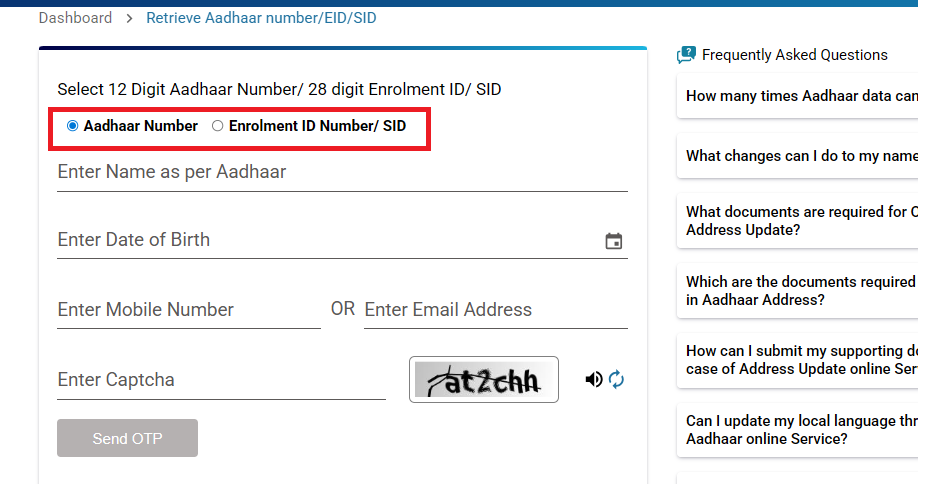
- Enter your exact enroled name.
- Input your registered mobile number (10 digits without country code) or email address, the UID will be sent only to the mobile number.
- Solve the CAPTCHA challenge, which includes an audio option for the visually impaired; refresh the CAPTCHA if it is unclear.
- Click “Send OTP” and wait 30 to 60 seconds for the 6-digit code to arrive via SMS or email.
- Enter the OTP in the provided field, noting that you have a limit of three attempts per day; request a new OTP if it times out.
- Upon successful verification, the UID will be sent via SMS, note it down immediately and save a masked version for security.
If an error message like “Invalid details” appears, retry after five minutes or proceed to update your details at an enrolment center.
No Mobile or Email Access (Offline Methods)
This scenario applies to inaccessible links or demographic mismatches; biometrics play a crucial role here.
Option A: Enrolment Center or Seva Kendra Visit (Biometric-Focused)
- Locate a nearby center using https://appointments.uidai.gov.in/easearch.aspx, where you can book a slot if preferred, though walk-ins are accepted or use the Bhuvan app for interactive maps.
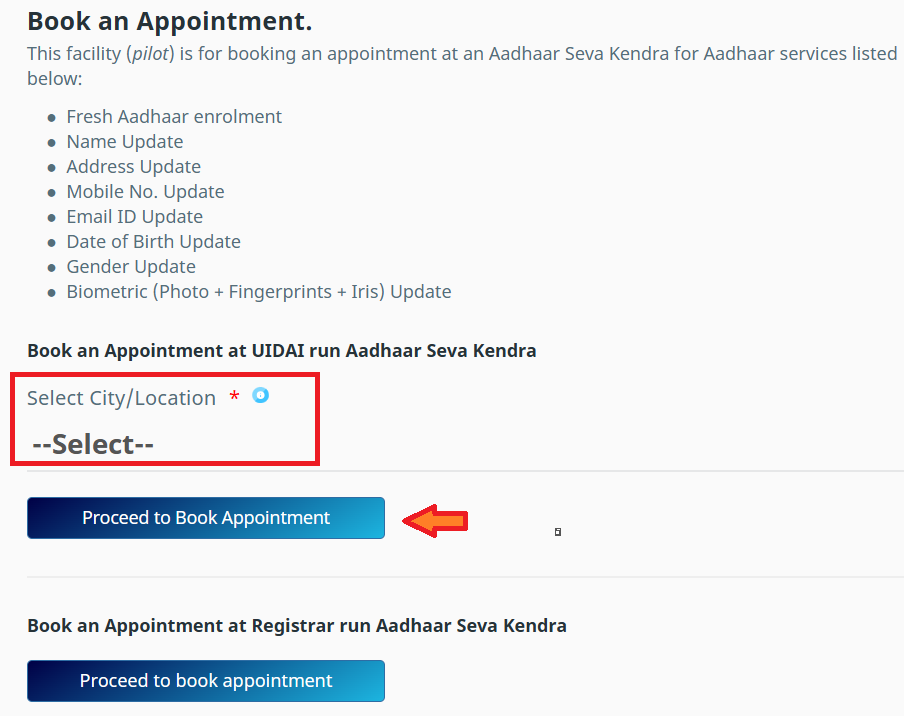
- Inform the operator upon arrival that you require “lost UID retrieval.”
- Provide demographic details such as your full name, gender, date of birth in DD/MM/YYYY format, PIN code, and district.
- If multiple records appear, add additional information like care-of details (e.g., father’s name) or village name to narrow down the results.
- Undergo biometric scanning by placing your index finger on the scanner or using iris recognition, with up to three attempts allowed; ensure your hands are clean for accuracy.
- If matched successfully, the UID will be displayed on screen; you can opt to print the e-Aadhaar.
- Update your mobile number on-site, which is free when done alongside retrieval.
Note: A practical tip is to visit in the morning to avoid crowds; for biometric exceptions like worn fingerprints, a manual photo approval process may take seven days.
Option B: Helpline 1947 (Voice-Based)
This option is available 24/7 in multiple languages and is ideal for remote users.
Stage 1: Obtain the Enrolment ID (EID) If Required
- Dial 1947 from any phone and select your preferred language from the options.
- Press 2 to connect with an executive, waiting 1 to 5 minutes if necessary.
- Provide your details to the executive, including name, date of birth, address, and PIN code.
- If a match is found, the 28-digit EID will be dictated to you.
Stage 2: Retrieve the UID
- Redial 1947 and select your language again.
- Press 1 for Aadhaar services, then 1 for status inquiries, followed by 2 for enrolment status.
- Enter the EID using the keypad, along with your date of birth and PIN code.
- If verified, the UID will be announced digit by digit, with an option to repeat.
Note: If issues arise, email support@uidai.gov.in for a response within 48 hours.
Lost Aadhaar – FAQs
If you lose your Aadhaar card, you can easily retrieve your Aadhaar number online and download your e-Aadhaar. A physical card is not required.
Yes. UIDAI allows you to retrieve your Aadhaar number using your registered mobile number and personal details.
No. A registered mobile number is required to receive OTP for Aadhaar number recovery.
Yes. You can download e-Aadhaar or order a PVC Aadhaar card as a replacement.