
Aadhaar Card is a unique identity document issued to residents of India that contains a 12-digit identification number linked to a person’s biometric and demographic information.
Aadhaar plays such an important role in daily life, people often need to download their Aadhaar, update Aadhaar details, or check the status of enrolment or update requests online.
My Aadhaar Services
Download, Update, Status, Appointment Booking, etc.
My Aadhaar Portal
Sign in to manage your Aadhaar.
UIDAI
Official portal of Unique Identification Authority of India.
Update Aadhaar
Change address, name, birth date, or documents online.
Enrolment and Update Status
Check status of enrolment or update request.
Retrieve Aadhaar number/EID/SID
Retrieve your identification or enrollment ID.
PVC Aadhaar
Order physical plastic Aadhaar card.
Track PVC Aadhaar Order
Monitor processing and delivery of plastic card.
Search Enrolment Centers
Find nearby Aadhaar facilities.
Book Appointment
Reserve slot at Aadhaar centers.
Virtual ID Generate
Generate 16-digit temporary identifier.
Aadhaar Card Download
The Aadhaar Card download process enables Indian residents to access their electronic Aadhaar (e-Aadhaar), a password-protected PDF version of the 12-digit unique identification number issued by the Unique Identification Authority of India (UIDAI).
- Visit the Official Portal: Go to https://myaadhaar.uidai.gov.in , then on the page click on “Download Aadhar”.
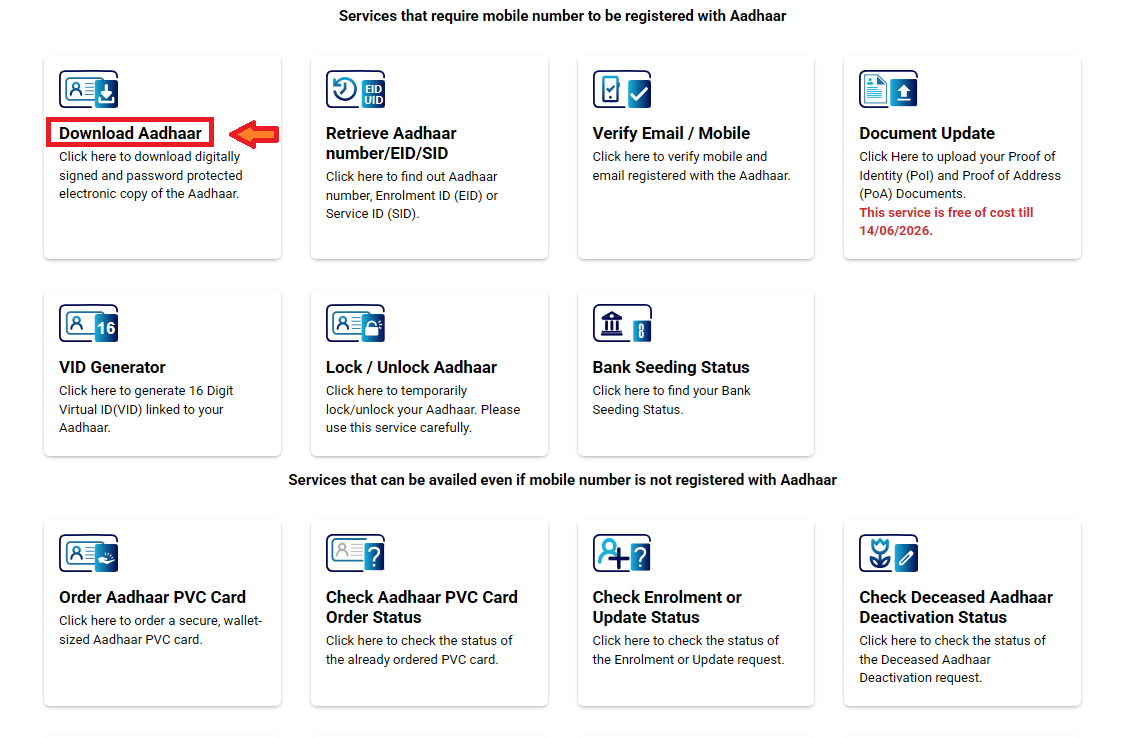
- Select your preferred method:
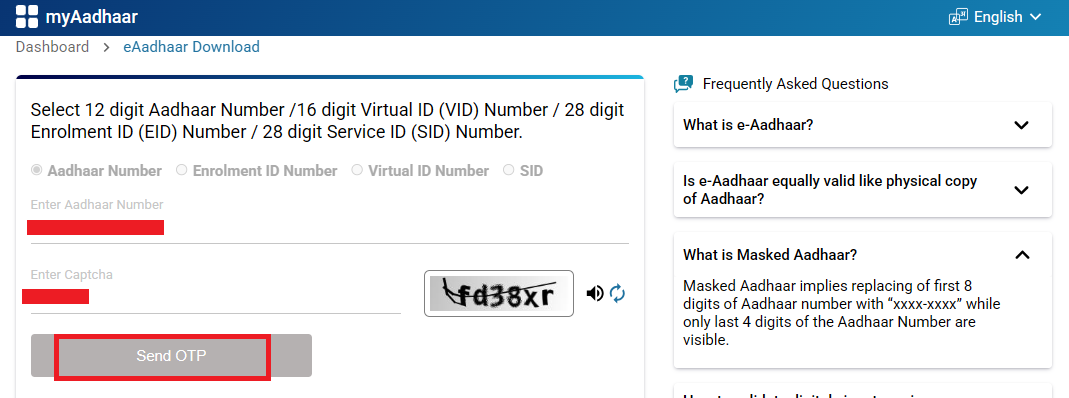
- Aadhaar Number: Enter your 12-digit Aadhaar number.
- Enrolment ID (EID): Enter your 28-digit EID, including enrollment date and time.
- Virtual ID (VID): Enter your 16-digit VID.
Note: SID (Session ID) is a temporary number created during an online request. It tracks that session only and expires once the process ends.
- Complete CAPTCHA: Solve the visual verification code to proceed.
- Request OTP: Click “Send OTP.” A one-time password is sent to your registered mobile number.
- Verify OTP: Enter the 6-digit OTP and submit to authenticate, you can select “Masked Aadhaar” if you prefer privacy.
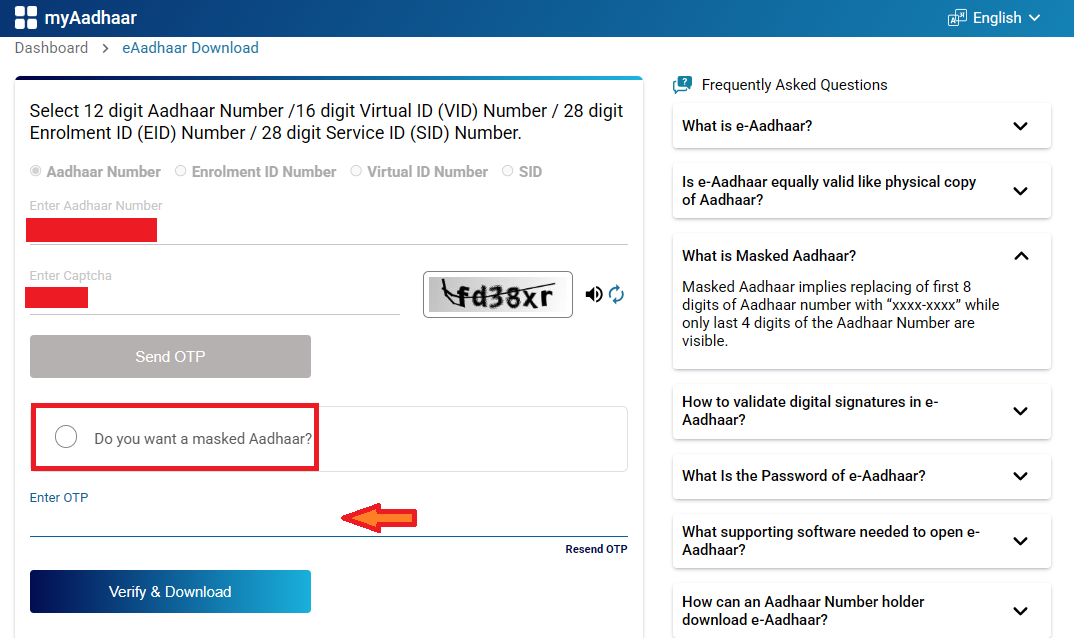
- Download the File: Click on Verify and Download, the e-Aadhaar PDF downloads automatically. It’s a secure, digitally signed document in PDF format.
- Open the PDF: Use Adobe Acrobat Reader to view. Enter the password: First four letters of your name in CAPITALS + birth year (YYYY).
Alternative Method 1: mAadhaar App
The mAadhaar app is a mobile application by UIDAI that lets users carry and download their Aadhaar digitally, share e-KYC, lock or unlock biometrics, and access Aadhaar services safely from their smartphone.
- Download and Install: Search for “mAadhaar” on Google Play Store or Apple App Store and install the official UIDAI app
- Register/Login: Open the app, set a 4-digit PIN for security, and register using your Aadhaar-linked mobile number. An OTP will be sent for verification.
- Add Aadhaar Profile: Enter your 12-digit Aadhaar number or scan the QR code from an existing Aadhaar card. Verify with OTP sent to your registered mobile.
- Download e-Aadhaar: Once added, select your profile, tap “Download Aadhaar,” and choose the regular or masked version. The PDF downloads to your device storage.
- Unlock and View: Use the password (first four capital letters of your name + birth year, e.g., “ABCD1995”) to open the PDF. Enable biometric lock in app settings for added security.
Alternative Method 2: DigiLocker
DigiLocker allows users to download their Aadhaar card digitally from UIDAI and store it securely in their account, making it easy to access, share, and use Aadhaar for various government and private services online.
- Sign Up/Install: Download the DigiLocker app from Play Store/App Store or visit digilocker.gov.in. Register with your mobile number (receives OTP) and link your Aadhaar by entering the number and verifying via OTP.
- Verify Identity: Complete e-KYC by allowing Aadhaar authentication; this pulls your demographic details automatically.
- Access Issued Documents: Navigate to the “Issued Documents” section, search for “Aadhaar.”
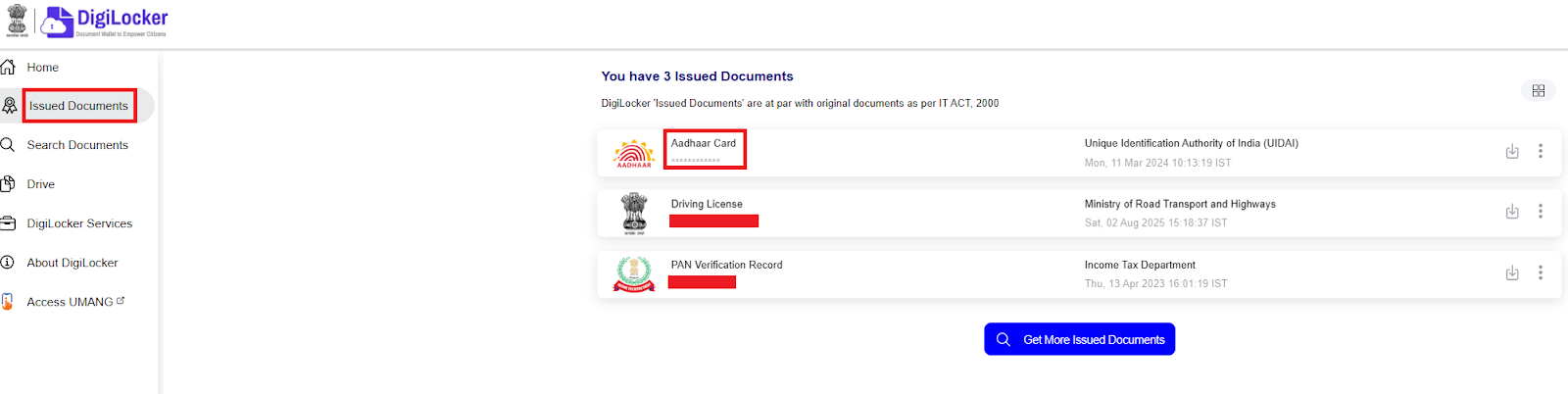
- Fetch e-Aadhaar: Click on the downward arrow, and choose in what format you want to download your e-aadhar. Thus select, and you will be able to fetch your e-aadhar
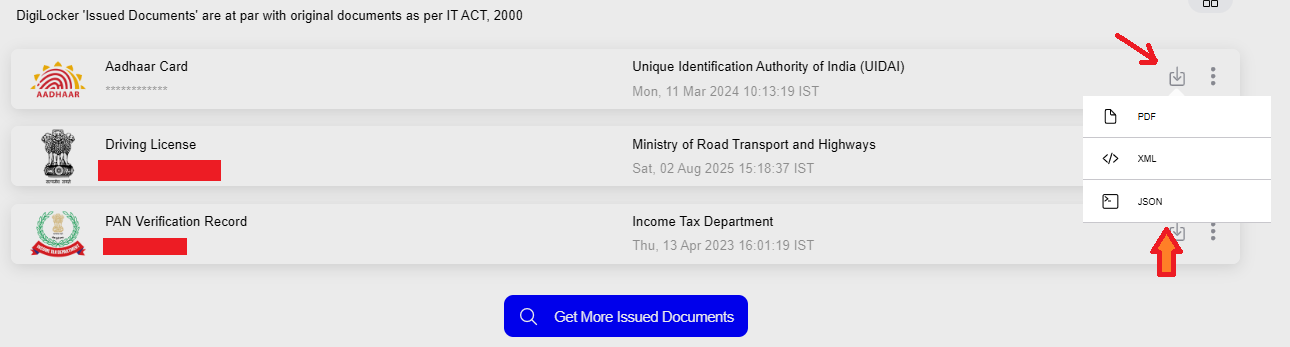
Alternative Method 3: UMANG App
UMANG is a government mobile app that lets users access Aadhaar services, download documents, check status, and use many public services in one place, making it easy to manage Aadhaar and other government services from a single app.
- Download and Register: Install UMANG from Play Store/App Store or visit web.umang.gov.in. Register with a mobile number/email, verify via OTP, and set MPIN.
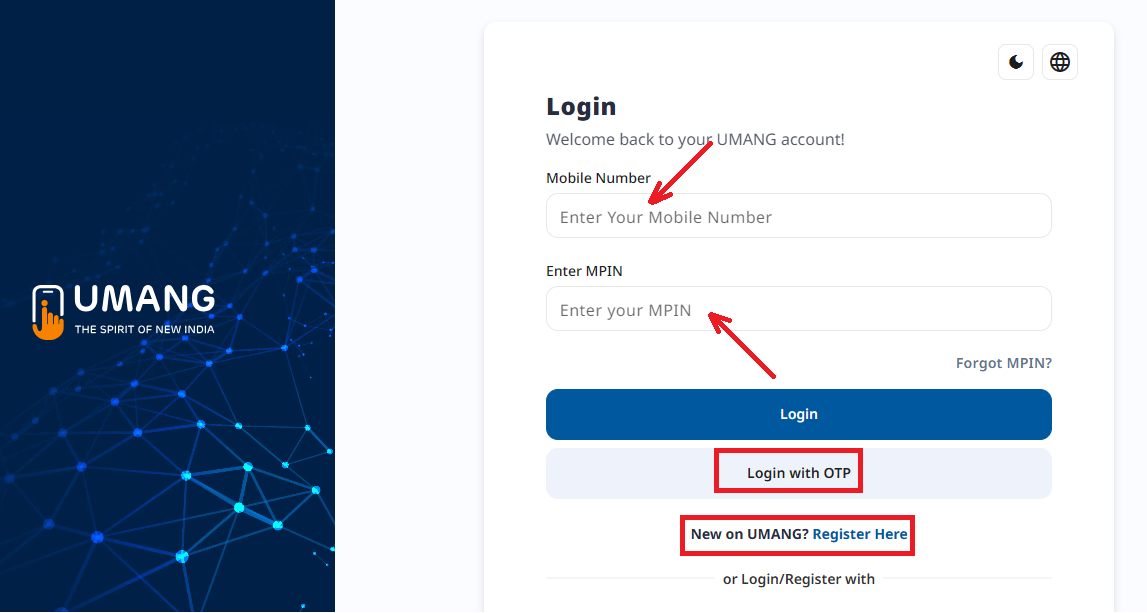
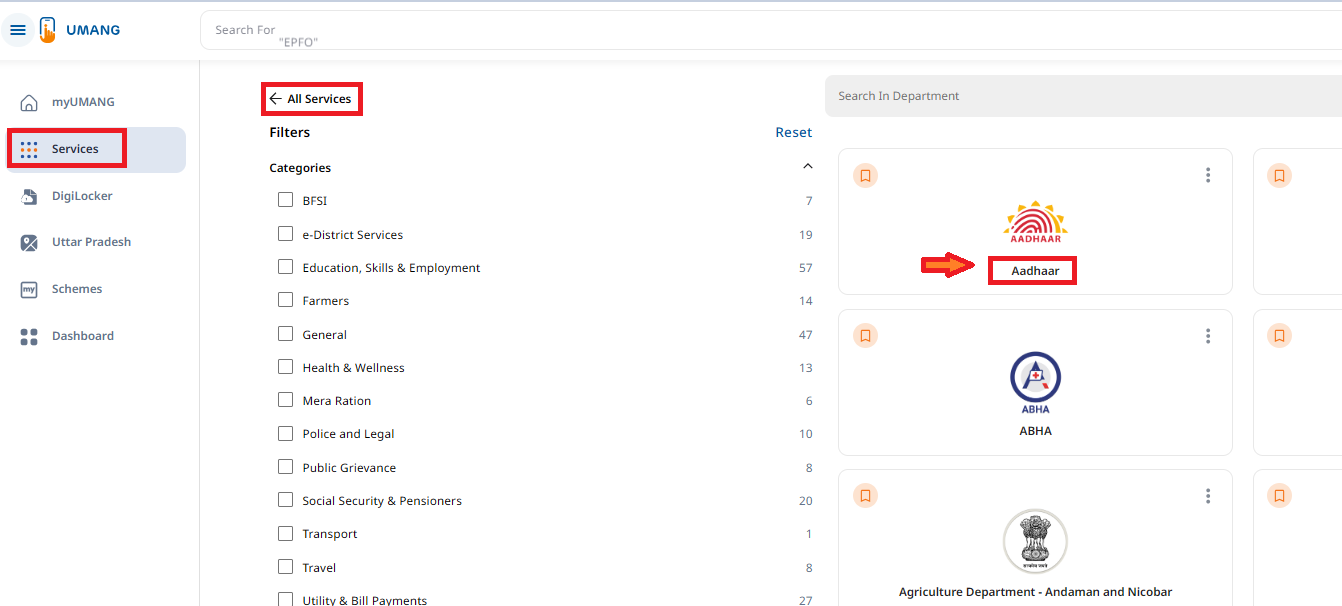
- Login and Search: Open the app, log in, and go to Services, then All Services and click on Aadhaar.
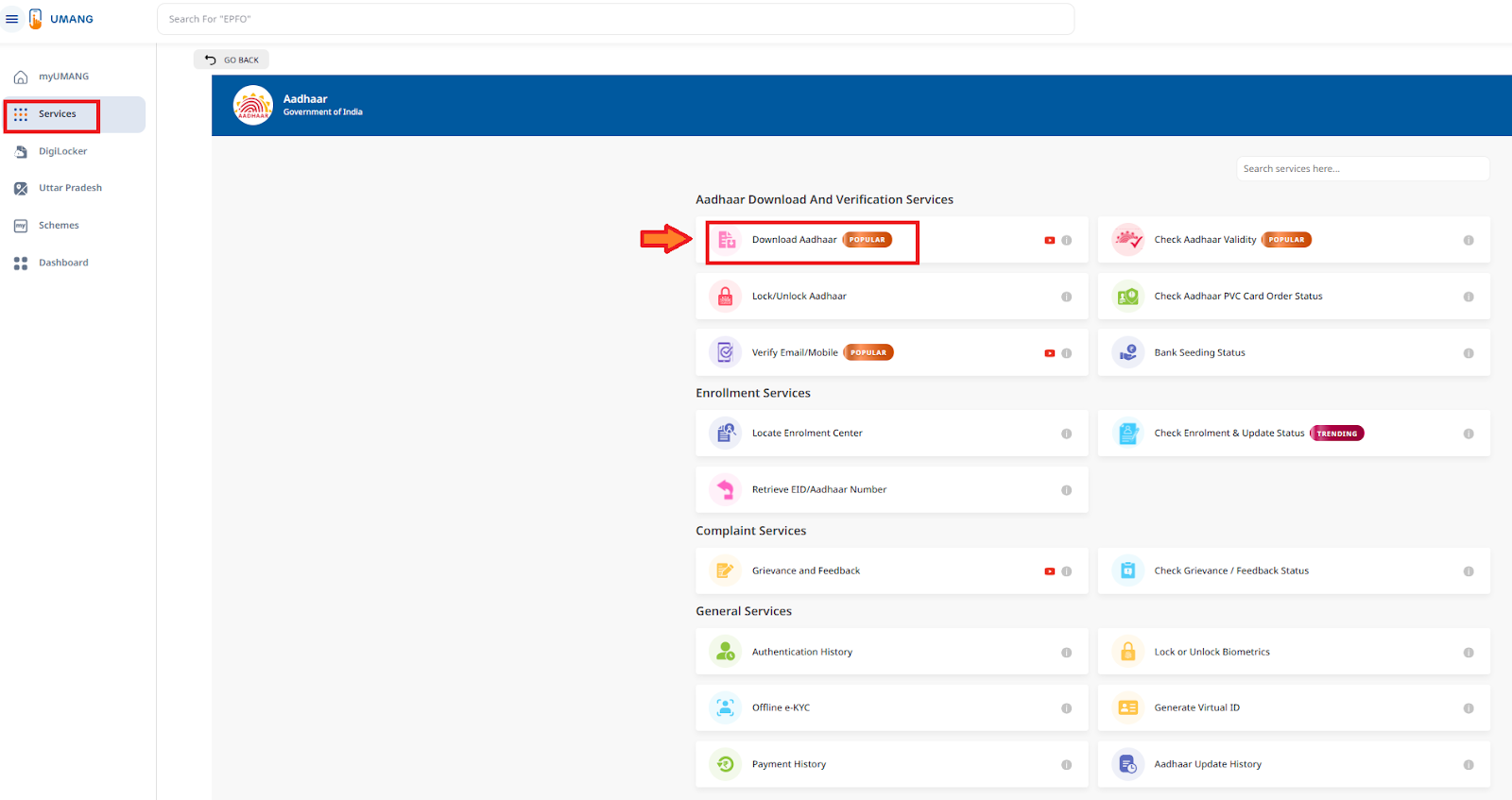
- Select Download Option: Choose “Download Aadhaar”
- Check Details: Check your details and, and click on Download
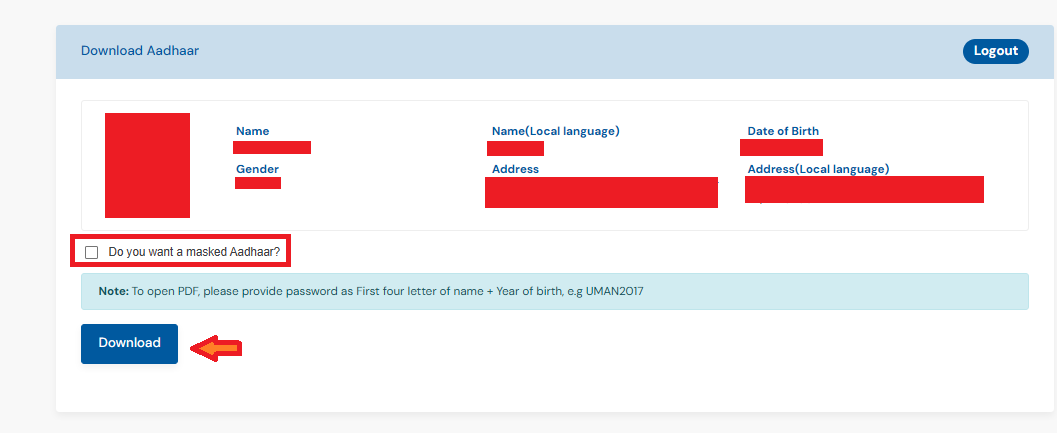
Alternative Method 4: Aadhaar Seva Kendra (Offline/Assisted)
If your mobile number is not registered, you can visit offline Aadhaar centers. Aadhaar Seva Kendras (ASKs), expanded to over 1,000 permanent centers, offer assisted downloads for those without digital access.
- Locate Center: Use UIDAI’s locator tool (https://bhuvan-app3.nrsc.gov.in/aadhaar/) or call 1947 to find the nearest ASK (open 9:30 AM–5:30 PM, excluding holidays).
- Visit and Provide Details: Carry your Aadhaar number or EID; inform the operator you need e-Aadhaar download/print.
- Verification: Operator verifies via biometric (fingerprint/iris) or OTP on registered mobile.
- Download/Print: They download the PDF and provide a colored printout if requested.
- Pay Fee (if applicable): Digital download is free; colored print costs Rs. 30 (inclusive of GST).
e-Aadhaar Password
The password to open your e-Aadhaar PDF is: First 4 letters of your Name (in CAPITAL) + Year of Birth, multiple examples are below:
| Name on Aadhaar | Year of Birth | Password | How it is formed |
|---|---|---|---|
| Rahul Kumar | 1995 | RAHU1995 | RAHU (first 4 letters) + 1995 |
| Sunita Devi | 1988 | SUNI1988 | SUNI + 1988 |
| Amit | 2000 | AMIT2000 | AMIT + 2000 |
| Riya | 1999 | RIYA1999 | RIYA + 1999 |
| Mohd Arif | 1992 | MOHD1992 | MOHD + 1992 |
| K. Rajesh | 1985 | RAJE1985 | RAJE (from Rajesh) + 1985 |
| Pooja Sharma | 1997 | POOJ1997 | POOJ + 1997 |
| S. K. Singh | 1975 | SING1975 | SING (from Singh) + 1975 |
| Ayesha Khan | 2001 | AYES2001 | AYES + 2001 |
| Dev | 1990 | DEV1990 | DEV + 1990 |
My Aadhaar Login
My Aadhaar Login is the official online service provided by UIDAI that allows Aadhaar holders to access and manage their Aadhaar details through the UIDAI website. After logging in using an OTP sent to the registered mobile number, users can download Aadhaar, update address, check status, generate Virtual ID, lock or unlock biometrics, and use other Aadhaar-related services securely.
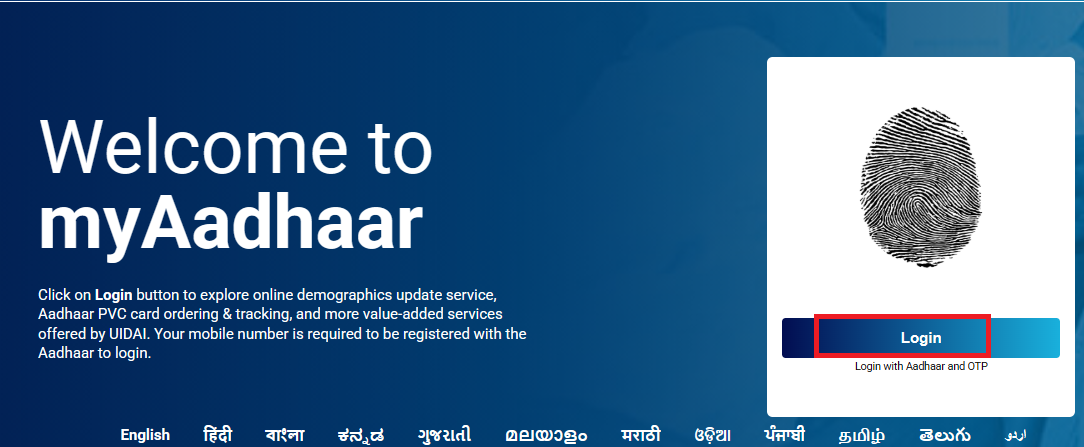
- Navigate to the official My Aadhaar portal at https://myaadhaar.uidai.gov.in/.
- Click on the prominent “Login” button located in the top-right corner.
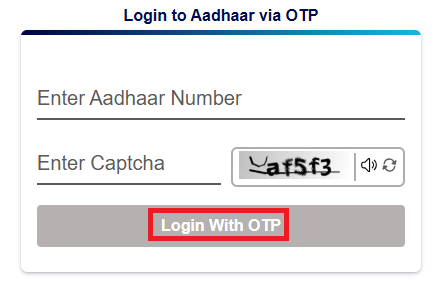
- Enter your 12-digit Aadhaar number in the provided field.
- Solve the CAPTCHA challenge by typing the displayed characters accurately, note that it’s case-sensitive and refreshes if unclear.
- Select “Login with OTP” (the default and recommended option for security).
- An OTP will be instantly sent to your registered mobile number; if not received within 30 seconds, check your signal or request a resend (limited to 3 attempts per session to prevent abuse).
- Enter the 6-digit OTP in the field and click “Login.”
- Upon successful verification, you’ll access your personalized dashboard, displaying options like recent updates and linked services.
Services Accessible Without Login
These services allow quick access without authentication, ideal for initial checks or non-personal actions.
Aadhaar Verification
This service confirms if an Aadhaar number is valid, active, and not deactivated, helping users or third parties ascertain authenticity without revealing personal details.
- Navigate to https://uidai.gov.in/en/.
- Click on “Verify Aadhaar” from the main menu or services section.
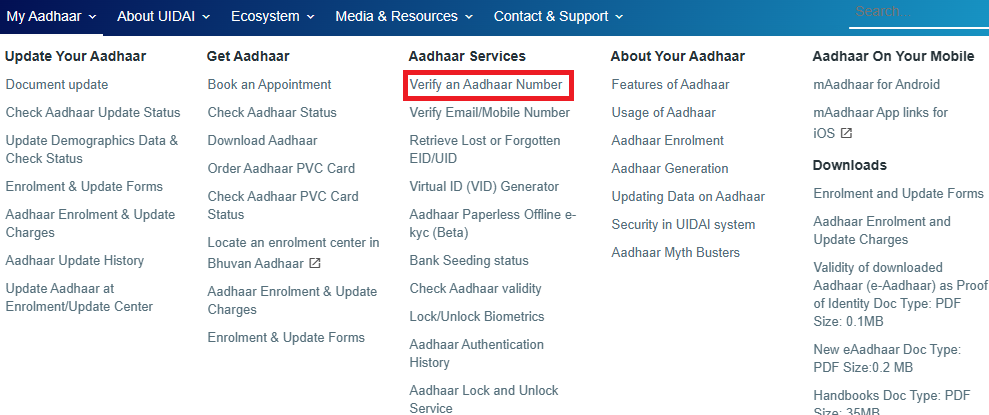
- Enter the 12-digit Aadhaar number in the provided field.
- Input the CAPTCHA code displayed on the screen to prevent automated queries.
- Click “Verify.” The system will display a message confirming validity (e.g., “Aadhaar number is valid and active“) or any issues like deactivation.
- If an error occurs (e.g., invalid CAPTCHA), refresh and retry. No OTP is needed, but for privacy, avoid sharing results publicly.
Verify Registered Mobile/Email
Checks if the mobile number or email address is correctly linked to your Aadhaar, essential for receiving OTPs and notifications.
- Go to https://myaadhaar.uidai.gov.in/.
- Select “Verify Email/Mobile Number” from the services list.
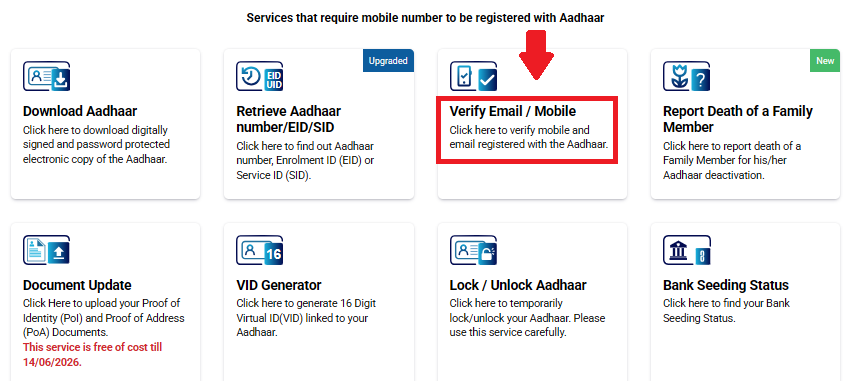
- Enter your 12-digit Aadhaar number.
- Input either the mobile number or email to verify.
- Enter the CAPTCHA.
- Click “Submit.” An OTP will be sent to the entered mobile/email if registered.
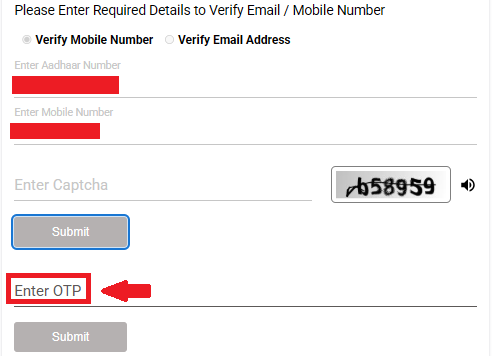
- Enter the OTP to confirm. Success shows “Verified“; if not, it prompts for update.
Check Enrolment/Update Status
Tracks the progress of new Aadhaar enrolment or pending updates using Enrolment ID (EID) or Update Request Number (URN).
- Visit https://myaadhaar.uidai.gov.in/.
- Click “Check Enrolment & Update Status.”
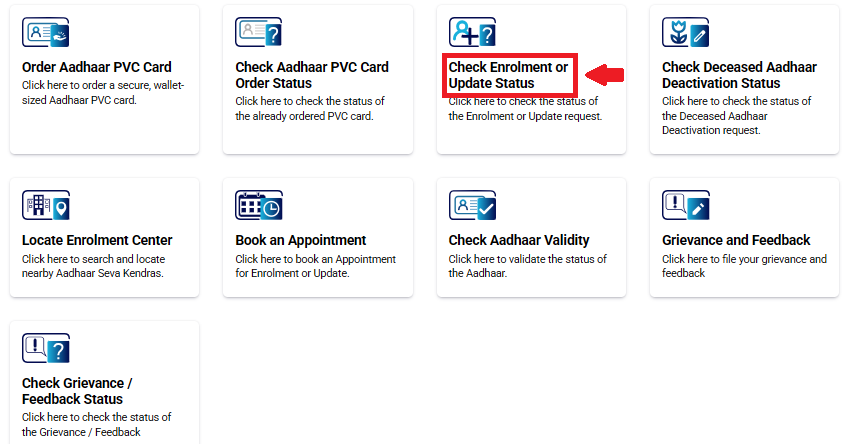
- Enter the 14-digit EID (for new enrolment) or 14-digit URN/SRN (for updates), along with date-time stamp if available.
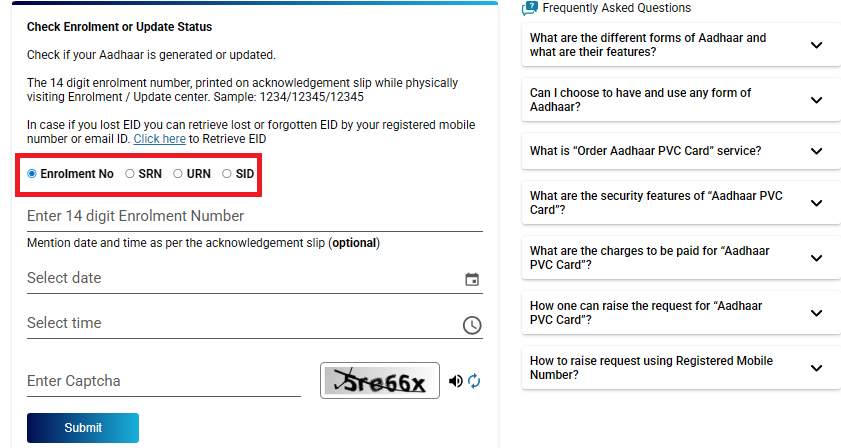
- Input CAPTCHA.
- Click “Check Status.” The portal displays stages like “Under Processing” or “Completed“.
Retrieve Lost UID/EID
Recovers a forgotten Aadhaar number (UID) or Enrolment ID using registered mobile/email
- Access https://myaadhaar.uidai.gov.in/.
- Select “Retrieve Lost or Forgotten EID/UID.”
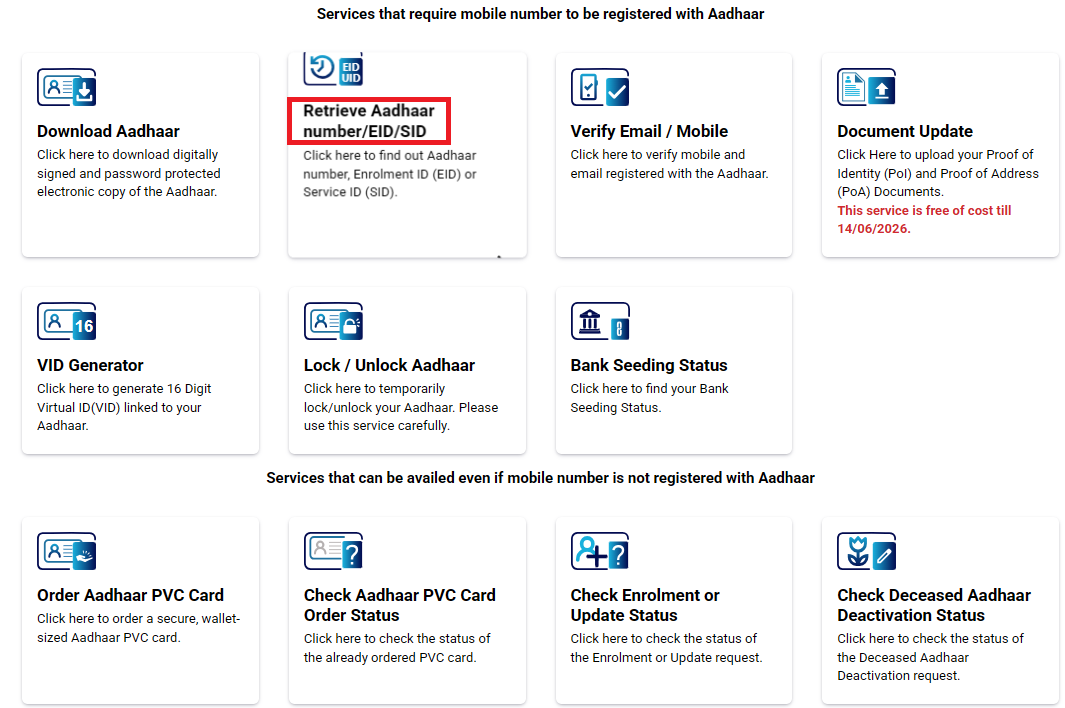
- Enter your full name (as per records), registered mobile or email.
- Input CAPTCHA.
- Click “Send OTP.” Receive and enter the 6-digit OTP.
- The UID/EID is displayed or sent via SMS/email.
Book an Appointment
Schedules visits to Aadhaar Enrolment/Update Centers for services requiring in-person biometrics.
- Go to https://myaadhaar.uidai.gov.in/.
- Click “Book an Appointment.”
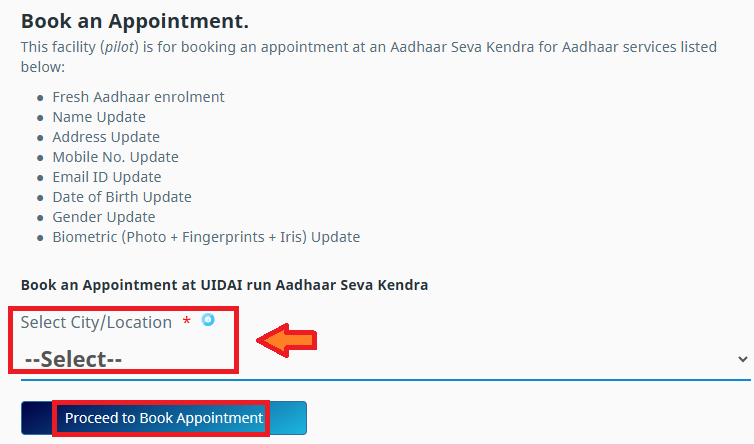
- Select service type (e.g., new aadhaar, document update).
- Enter PIN code or state/district to find centers.
- Choose date/time from available slots.
- Fill personal details (name, mobile) and CAPTCHA.
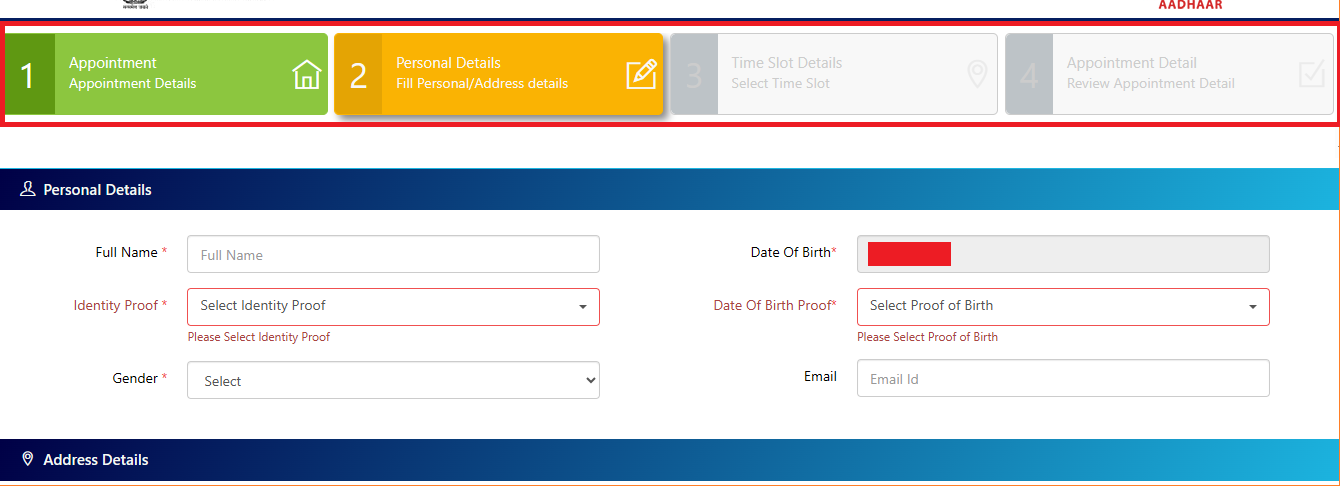
- Confirm via OTP if prompted. Receive confirmation SMS/email with token.
Locate Enrolment Center
Finds nearby Aadhaar centers for enrolments or updates.
- Navigate to https://myaadhaar.uidai.gov.in/.
- Click “Locate an Enrolment Center.”

- Enter state, district, or PIN code.
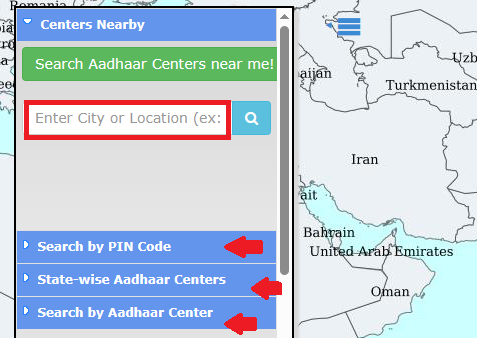
- Optionally, filter by center type (permanent/bank/post office).
- Click “Search.” View list with addresses, timings, and contact numbers.
File a Complaint
Registers grievances related to Aadhaar services, like delays or center issues.
- Go to https://myaadhaar.uidai.gov.in/.
- Select “Grievance and Feedback“
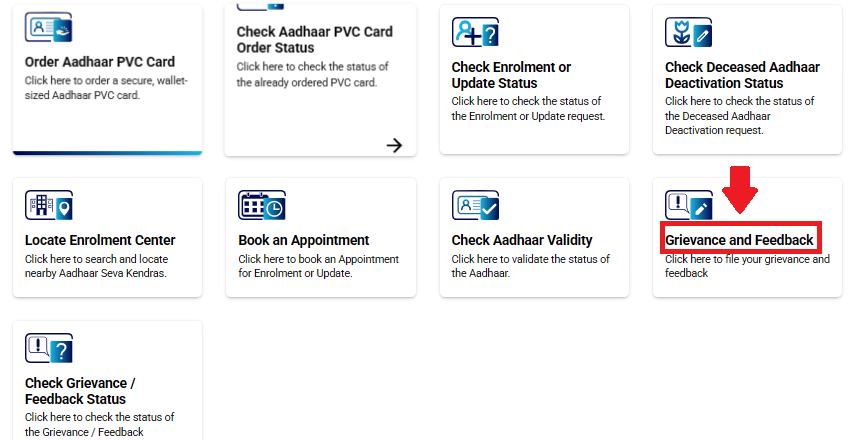
- Choose category (e.g., enrolment issue, update delay).
- Fill details: Name, mobile, Aadhaar (optional), description.
- Upload supporting documents (PDF/JPG, <2MB).
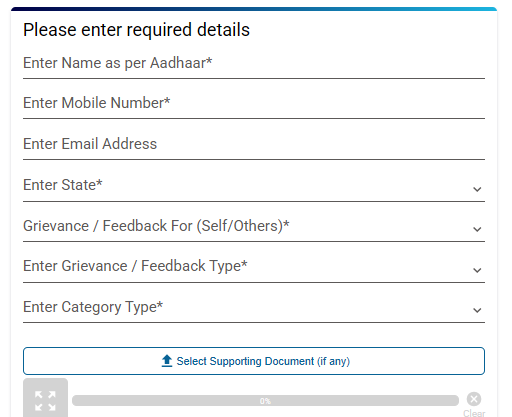
- Submit after CAPTCHA. Receive ticket ID via email/SMS.
Services Requiring Login
These personalized services need Aadhaar-based authentication for security.
Download e-Aadhaar
Downloads a masked or full PDF version of Aadhaar for digital use in KYC or proofs.
- Go to https://myaadhaar.uidai.gov.in/ and click “Login.”
- Enter 12-digit Aadhaar, CAPTCHA; receive OTP, enter to log in.
- From the dashboard, select “Download Aadhaar.”
- Choose a regular or masked version.
- Download PDF, and open with password.
Update Address in Aadhaar
Changes residential address online using valid Proof of Address (PoA).
- Login at https://myaadhaar.uidai.gov.in/ using Aadhaar/OTP.
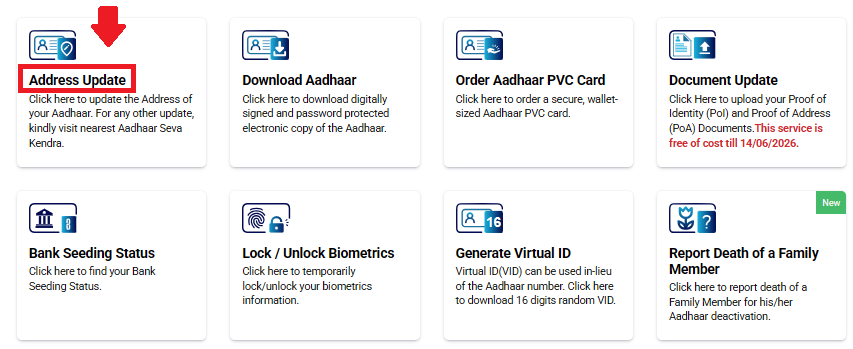
- From the dashboard, click “Update Address.”
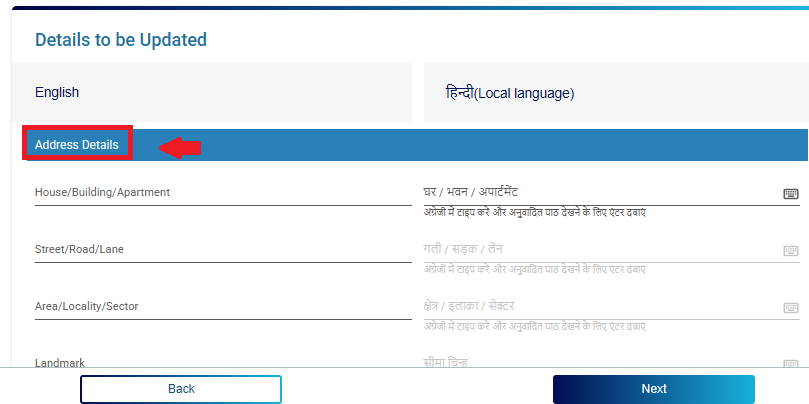
- Enter new address details in fields.
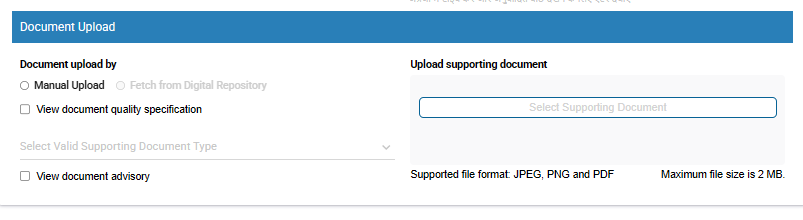
- Upload scanned PoA document (PDF/JPG, <1MB).
- Preview and submit.
- Receive URN via SMS/email.
Document Update (PoI/PoA)
Uploads new Proof of Identity (PoI) or PoA for name, DOB, gender corrections.
- Login via Aadhaar/OTP at https://myaadhaar.uidai.gov.in/.
- Select “Document Update” from the updates section.
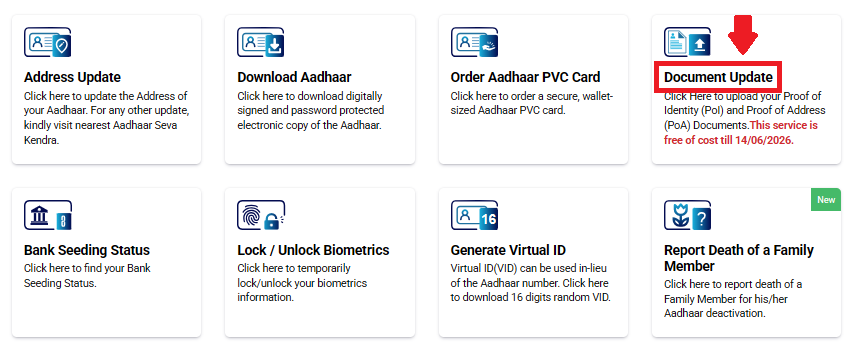
- Choose a field to update (e.g., name), apart from address the other demographics needs to be updated in the nearest Aadhaar Centre
- Upload supporting PoI/PoA (e.g., passport for name) and submit.
Aadhaar Authentication History
Views log of when and where Aadhaar was used for authentication.
- Login to dashboard at https://myaadhaar.uidai.gov.in/.
- Click “Aadhaar Authentication History.”
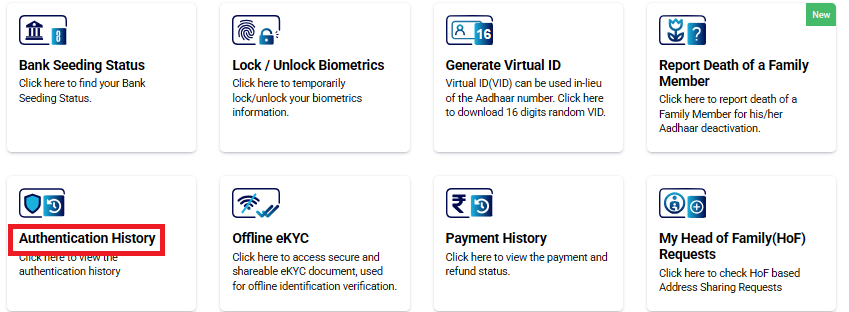
- Select date range (up to 6 months).
- Enter OTP for access.
- View list with dates, requestor (e.g., bank name), type (biometric/OTP).
- Download the report if needed. If no history, it means no authentications.
Biometric Lock/Unlock
Temporarily disables/enables fingerprint/iris use to prevent misuse.
- Login with Aadhaar/OTP.
- From security section, select “Lock/Unlock Biometrics.”

- Choose “Lock” or “Unlock.”
- Confirm with another OTP.
- Status updates instantly. If locked accidentally, unlock via same process; no fee.
Generate or Retrieve VID
Creates a 16-digit Virtual ID for privacy, masking actual Aadhaar.
- Login to https://myaadhaar.uidai.gov.in/.
- Click “Generate VID“.
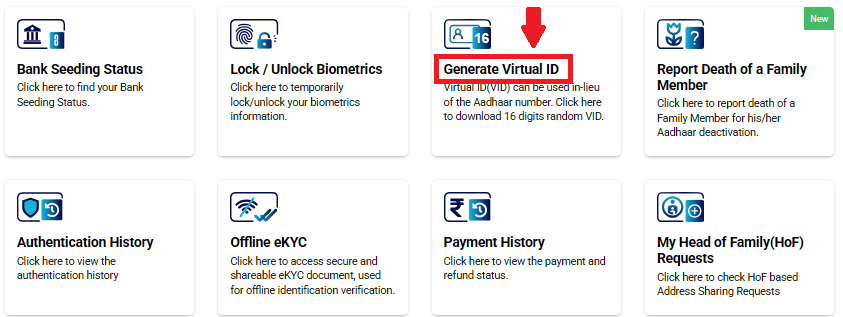
- For generate: System creates one instantly.
- For retrieve: Enter OTP to view existing.
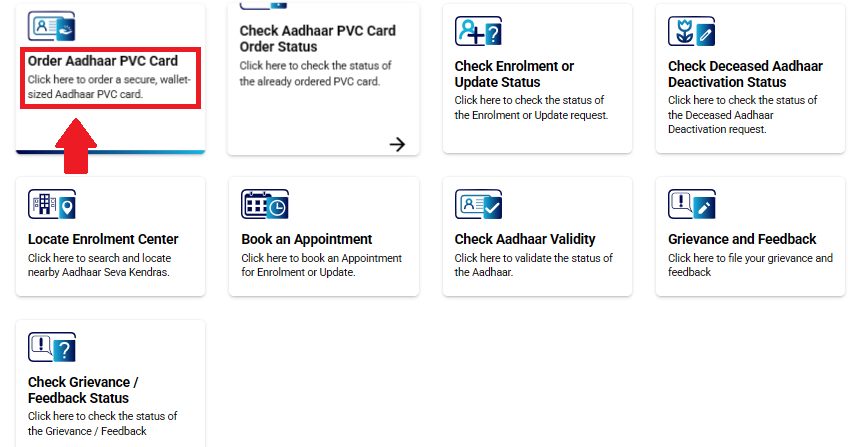
Order Aadhaar PVC Card
Requests a durable, wallet-sized PVC version of Aadhaar with hologram and QR code for physical use.
- Visit https://myaadhaar.uidai.gov.in/.
- Select “Order Aadhaar PVC Card.”
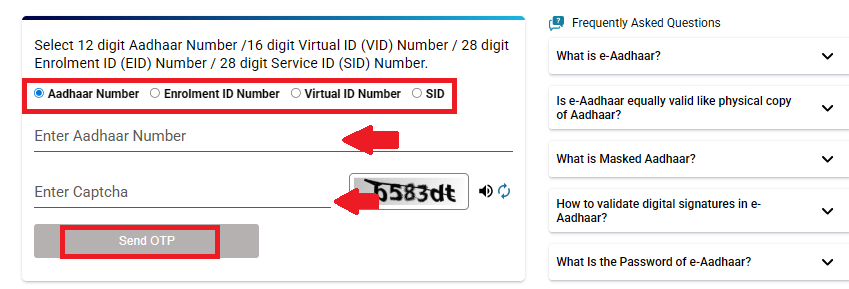
- Enter Aadhaar number, VID, or EID.
- Input security code (CAPTCHA).
- Verify details via OTP sent to registered mobile.
- Pay ₹50 via UPI, card, or net banking.
- Receive SRN for tracking. Card will be delivered to registered address.
UIDAI (Unique Identification Authority of India)
UIDAI (Unique Identification Authority of India) is the statutory authority under the Government of India responsible for issuing and maintaining Aadhaar. It assigns every resident a unique 12-digit Aadhaar number based on biometric and demographic data.
UIDAI manages Aadhaar enrolment and update services, provides online tools for Aadhaar download, e-KYC, status tracking, VID generation, and biometric locking, and ensures the security, accuracy, and nationwide validity of Aadhaar records. UIDAI is responsible for the complete Aadhaar system, including:
- Issuing 12-digit Aadhaar numbers
- Managing Aadhaar enrolment and update centres
- Operating online Aadhaar services
- Providing e-KYC and authentication services
- Protecting Aadhaar data and biometrics
- Maintaining Aadhaar security and privacy
Helpline
If you face any problem related to Aadhaar such as download issues, update status, or correction requests, UIDAI provides official customer support for all residents.
| Toll-Free Helpline | 1947 |
| Email Support | help@uidai.gov.in |
| Working Hours | 24×7, all days |
| Language Support | Multiple Indian languages |
| Service Coverage | Aadhaar enrolment, update, download, status, PVC card, e-KYC |
Aadhaar & UIDAI – FAQs
Aadhaar is a 12-digit unique identification number issued by UIDAI (Unique Identification Authority of India) to residents of India based on biometric and demographic data.
No. Aadhaar only proves identity and residence. It does not confirm Indian citizenship.
Any resident who has lived in India for at least 182 days in the last 12 months can apply, including children and senior citizens.
No. UIDAI allows only one Aadhaar number per individual.
Aadhaar includes name, date of birth, gender, address, photograph, fingerprints, and iris scan.
e-Aadhaar is the digital version of Aadhaar and is legally valid wherever Aadhaar is accepted.
You can check Aadhaar enrolment or update status online using your Enrolment ID (EID) or Update Request Number (URN).
VID is a temporary 16-digit number that can be used instead of your Aadhaar number for authentication and downloads.
Masked Aadhaar hides the first eight digits of your Aadhaar number, making it safer to share.
My Aadhaar is the official UIDAI online portal used to download Aadhaar, update details, check status, and access other services.
Aadhaar services are provided through Aadhaar Seva Kendras, authorised enrolment centres, banks, post offices, and CSC centres.
It is safer to share Masked Aadhaar or use Virtual ID instead of giving your full Aadhaar number.